
Introduction to Website Building
Days are gone when people depend mainly on manual way of carrying out their functions and businesses. Today, many things have changed in a very big way. People are searching for how to development their skills in technologically related approach. Some people want to learn what is trending because the old skills they learnt are not selling well again. A friend once said that a time will come in the life of a man when things in office work will change totally. He said that that time work like face to face marketing by employees will not sell much again. What companies will be doing then will be using their technologically amplified machines and skills to make sales. They advertise their products and services through their websites and make sales through their mobile applications. And the surprising thing is that it seems what he said is already happening. With the outbreak of Covid-19 pandemic disease in the year 2019, many workplaces including offices were short down. The economies of many nations were put at standstill. Many companies and individuals lost a lot of money with this outbreak. Even some companies sacked their workers because they could not afford to pay them again. It was a big problem. But do you know what? Irrespective of this pandemic, some companies were still making good money as profit. Examples of such companies are Netflix, Google, Microsoft, and Amazon.
You may ask why the pandemic did not affect them. The answer is simple; they embraced technology and utilized them. Those companies are all tech amplified companies. They make their money through websites or online businesses. One of the skills that you as a reader of this book need is tech skill. And an example of the tech skill is website building and website design which work hand in hand. You are handling the right book and I will guide you through on how to do this. If you need more clarification after reading through this book, you can send email to me personally. I will not hesitate to answer you. Believe me you will be happy you spent money to buy this book. I am here to guide. You will learn A-Z information on what you need to build a website of your choice and how to do it. Even if you need a book on how to build a specific kind of website, write to me and I will put you through. I will leave my email on one of the last pages of this book.
Why you need to Learn Website Building and Design
 The terms website design and website building are used interchangeably, so whether we use “website design” or “website building”, we are talking about two related ideas because a professional cannot build a website without designing the site. The reasons you need to learn website design skill are:
1. It will give you idea on how things work on the web. Doing so will make you see Web Pages you see as real and not a product of magic. When some people do not understand how certain tasks were carried out, they were carried away when they see the operation of such things.
2. Website building skills places you ahead of other prospective employees seeking for job. When you possess this skill, you are respected. When job applicants are called for job interview and almost everyone have similar skills, you having something different and unique will put you ahead of the others. Such skill sends a message to the management of the company that this guy or lady is different from others. He can help us in tech section!
3. Having web building skill can make you earn money. Website design skill is a selling skill in this twenty first century. There are companies who are searching for website builders to help them in building and maintaining websites. Some of these companies are ready to pay you well in as much as you help them create stunning sites. What they need is satisfaction. Once they are satisfied with your work, they are ready to pay you well and employ you as permanent staff or pay you on contract basis. When they pay you on contract, they give you freedom to build for other clients and make more money for yourself. In developed countries, website builders live large because they earn well.
4. Web building and design skills can make you to be self-employed. Unlike some office works whereby you must be answerable to a buy, a website builder who has networks of clients do not necessarily need to be answerable to any boss before he can eat. A great designer of the web who has many clients can be a boss of his or her own. He can earn more than the people that are paid on salary basis. Being a website designer gives you the opportunity to explore other skills you have. You draw you plan on when you want to complete a client project and when you want to go into other side earning works. You cease to be limited by any boss in any office.
5. When you are a website builder, people respect you because of the skill. To so many out there, that is not a skill that is easy to acquire. But to be honest with you, it is easy these days and that is what I will be teaching you in this course. I could remember the surprises I saw in people’s face when I told them that I am a website builder. It is an honor to be someone that builds a platform that people from different parts of the world can see and visit irrespective of their locations.
The Tools you need to Build a Website
You might have seen some posts on the web telling you what you need to be able to build a website. You might have seen some books telling you about plenty of tools you need to create a website that people can access from different parts of the world. They may be right about those tools you read about. They may tell you or sorts of technical problems. They are right with their problems? But let me ask you, what did they tell you? They told you that you need deep knowledge of HTML 5, CSS, Java Script, JQuery, PHP/TWIG/ASP.NET ETC, Adobe Illustrator, Adobe Photoshop, and Mockup / Wire framing Tools?
At seeing those terms alone, you got tired, right? You even went and bought some books to learn those jproblems, but you could not understand what was written in that book. Did that happen to you? You were studying one of the textbooks and you were tired already. When you looked at the bunch of codes on the book, you were engulfed in fear. You asked yourself where you go from here. How do I get this thing done? Hey, listen to me; you do not need deep knowledge about those problems at a dummy stage. Read that line again. Do you get that clear? I said you do not need deep knowledge on those areas for now. What should be your interest for now is how to build a website that is working properly and with time you can understand those areas you read in books or articles.
The tools you need to build a website as a beginner are your internet connection, your few dollars as from $20 up to pay for domain name registration and hoisting, your laptop or any working computer, and your attentiveness to learn. These are all you need to build a website. In fact, you can even do without laptop computer. If you know your way, you can create websites using your mobile phone. Did that sound surprising to you? As a designer, I have built some sites from my phone.What I do is that when it gets to technical sections, I fall back to my laptop to set things up. As for now, you get your laptop to have clearer view and understanding of what we will be doing. Many things have changed in website building and that’s why am giving you updated information. Don’t say this loud. It is a secret so keep it. Are you listening gently? Many website builders do not give you details on how to build and design websites in free articles because they want you to pay before you can learn the skill.That is why they confuse your head with many technical problems.
What is Website Building and Website Design
Before going deep into the main terms, let us know what a website is. A website is a collection of web pages and related content that is identified by a common domain name and published on at least one web server. A domain name is the name that identifies a website. Domain names are given by Domain Name Registrars. If a domain name is already registered by a particular person, another person cannot register that same name. In a website like www.amazon.com, the domain name is “amazon”. There cannot be any two amazon on internet. But from the main domain name subdomain can be obtained. That is to say that other websites can be created from the principal name “amazon”. For example, www.kdp.amazon.com is a subdomain website created from www.amazon.com. Website building is the action of constructing a website. In website building, the website builder starts from the scratch to the completion of the website. He starts from the domain name registration and then gets to the design aspect of the site. He chooses the hoisting company he believes will hold the pages always on the web by having the site files in their server. After that he pays them before he finally starts the design of the project. In other words a website builder does more of the job than a designer of websites. But the two are taken to do the same job in market. So in this book, we are using the market approach to use the two terms. Web design refers to the design of websites that are displayed on the internet. It usually refers to the user experience aspects of website development rather than software development. Web design used to be focused on designing websites for desktop browsers; however, since the mid-2010s, design for mobile and tablet browsers has become ever-increasingly important.
Before some designers of the web start with their design job, they first draw plans. The plans can be on a paper. That is just a sketch of what they want to have displayed on the website after the final design. The design can be the components of the menu bar, the slides on the header of the site, single or double site bars, the contents of the body of the site, the site pages, the contents of the site footer and the kind of logo to use. Some expert designers of the web usually have the design on their head. They add the designs of what they want on the site as they progress. At the end of the design, they have stunning work that every visitor to the website is pleased with. In some cases, websites can be redesigned even when it has started its full function.
Types of Websites
There are different types of websites. And classifications of websites can depend on many factors. Website can be classified base on use. That is to say that they are classified based on what they are used for. Also, website can be classified on hosting and on the nature of the web pages. On the other hand, websites are classified base on the nature or state of the web pages. Web pages as used here mean the posts on the website.
Types of Website base on use
Types of website base on what they are used for are as follow:
1. E-Commerce Website
2. Business Website
3. Entertainment Website
4. Portfolio Website
5. Media Website
6. Brochure Website
7. Organizational website
8. Educational Website
9. Infopreneur Website
10. Personal Website
11. Web Portal and
12. Community Forum Website
Types of Website base on Hosting
Types of website base on hosting are:
– Hosted and
– Self-hosted website
Hosted Website
A hosted website is one that is built on a website builder such as Wix, Squarespace, WordPress.com and blogger.com. These are software as a Service (SAAS) platforms offering an all-in-one website solution. They provide the hosting (the servers that house all your website files) and the software to build your website. But you’re limited to using their tools and templates, and you have limited, if any, access to the code for customization.
Self-hosted Website
A self-hosted website is the type of website a person pays to website hosting company to have the domain on their server, pays to domain name registrars to get the domain name, and then design the website to his taste. In this kind of website, the website builder has access to play with codes on the site and customize it to his type. This is the type of website we are discussing in this book. A self-hosted site gives you the freedom to create whatever you want. There are many hosting companies that allow you to achieve your aim of building self-hosted sites by helping you have your website files stored in their servers. Example of these website hosting companies are Hostgator.com, InMotion Hosting, Hostinger, Cloudways, Hostwinds, GoDaddy, Bluehost, iPage, Smartweb.com.ng, interserver.net, and WordPress.org. Do not be confused between WordPress.org and WordPress.com because their functions vary.
Classification of Websites base on Action/Motion
Websites can be classified bases on their ability to move or not. In this kindof classification, we have static and dynamic websites.
Static Website
The word static refers to something that is fixed, that doesn’t move or change in any way. This is somehow a little highlight on what a static page is about. No elements on this page are changed when accessing it. Static websites are basic pages that require simple code and design elements to create. “Static” also refers to the website being fixed in terms of page numbers. A fixed number of pages are delivered just the way it is designed and stored. The website can contain only 2 pages. Static web pages are suitable for content that never or rarely needs to be updated, though modern web template systems are changing this. Maintaining large numbers of static pages as files can be impractical without automated tools, such as static site generators. In static websites, the HTML codes are not generated on the server. This makes it difficult to edit the posts on the website. Static websites consist of HTML, CSS and Java Script. But sometimes not all these computer languages are necessarily contained on a static website. As we said before, in static websites, the codes are not generated on the server. In static website, the page content can change through java script on the browser but not on the server. Please note that a site is called a static website does not mean the site does not change. What it implies is that the change cannot be done on server. The page content can change in the browser through java script. But the files on server remain the same. The files are pre-built during development and not changed on server.
Dynamic Websites
This type of website is different from static website as the HTML codes are generated from the server and can easily be changed. The HTML markups of dynamic websites are dynamically on server.A dynamic website is a site that contains dynamic pages such as templates, contents, scripts etc. In a nutshell, the dynamic website displays various content types every time it is browsed. The web page can be changed with the reader that opens the page, character of consumer interplay, or daytime. In this kind of website, a reader may be reading a post on the site, you as an administrator changes some files on the post, and immediately the reader refreshes the page sees something different. The difference is because of the quick changes you made in the files stored in the server that stores the files.
In dynamic websites, the HTML codes are built dynamically for each request. Dynamic website requires a host who keeps your site alive on their server. Host needs to support the chosen server-side language in this kind of website. These websites are truly dynamic, meaning that the data and content in text, images, video, voice, and animation etc can be ever changing just like in real time. In this, the owner of the website has an Admin Log in Panel to access his dashboard to update new changes directly to the server where the website files are stored if he has website building skill. Examples of dynamic websites like Blogspot Blogs, WordPress Blogs, Any E-commerce sites, Calendar or to-do sites, and news websites. Dynamic sites use languages like PHP to interact with information stored in databases.
The History of Website
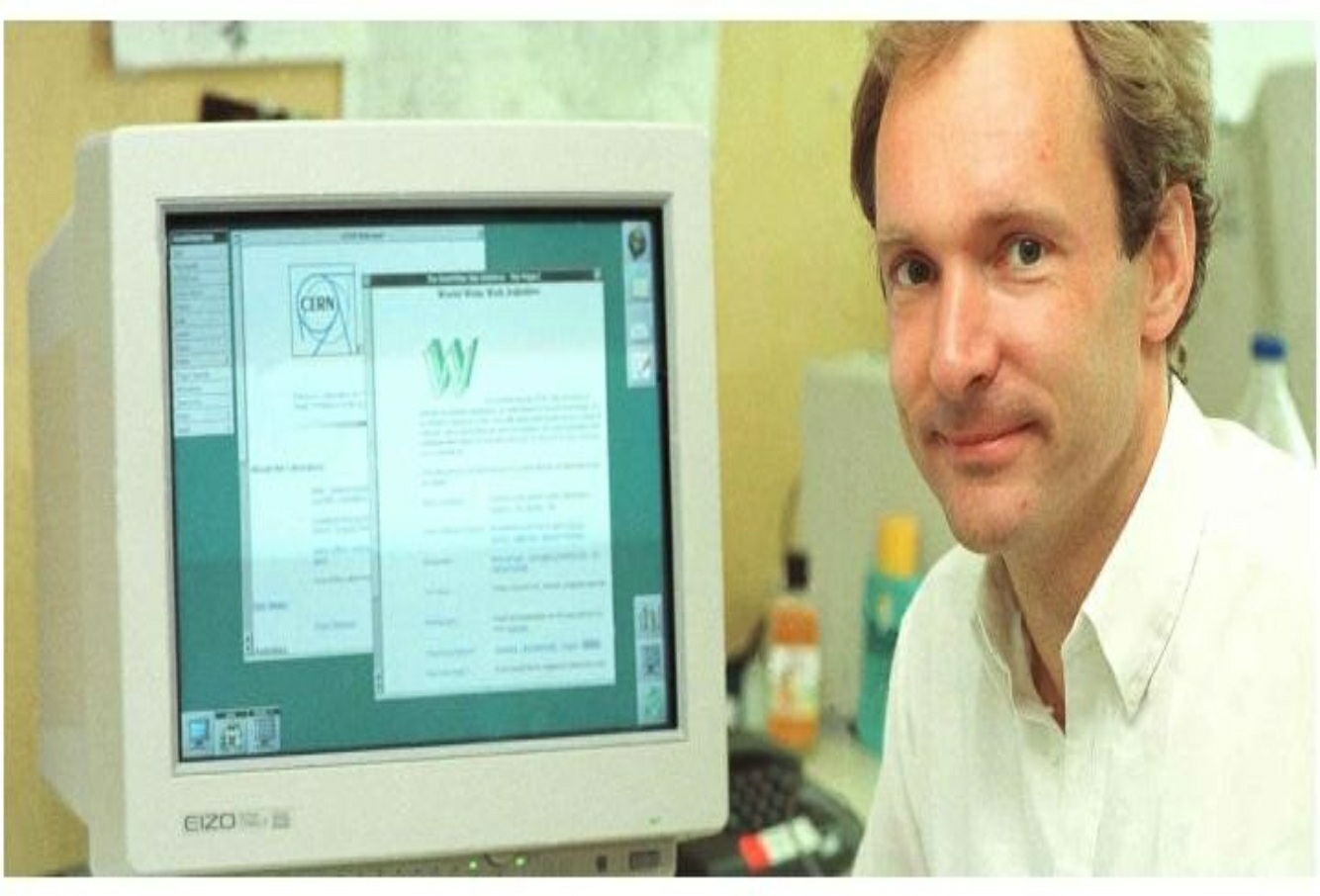 This is a very important section to know in technical title like this. History of Web (Website) is what many website builders do not think about sometimes. It is good for us to have idea of when website began its existence. If you do not know, you may think that web just started 10 years ago. The truth is that World Wide Web is old. But the dynamism we have in it makes it simple. It is the work of a great thinker who has passion for computer and software development. Sir Tim Berners-Lee, a British, invented the World Wide Web.
He is an intelligent man with great ideas. Sir Tim Berners-Lee is a British computer scientist. He was born in London,and his parents were early computer scientists, working on one of the earliest computers. He later graduated from Oxford University and entered the real world. He started work at CERN. In that organization, he worked as software engineer. CERN is the large particle physics laboratory near Geneva, Switzerland.
Scientists came from all over the world to use its accelerators, but Sir Tim noticed that they were having difficulty sharing information. He saw such as technical issue. Sir Tim Berners-Lee thought he saw a way to solve this problem – one that he could see could also have much broader applications. Already, millions of computers were being connected together through the fast- developing internet and Berners-Lee realized they could share information by exploiting an emerging technology called hypertext. The great scientist saw the vision of how website can be built to make information go round together without much stress. In March 1989, Tim laidout his vision for what would become the web in a document called “Information Management: A Proposal”. Though his proposal looked great, it was not accepted immediately. His boss then by name Mike Sendall delayed working on the proposal first.
Later, Mike allowed Sir Tim to start working on the project. This Tim began in September 1990. He began the work using a NeXT computer. By October of 1990, Tim had written the three fundamental technologies that remain the foundation of today’s web (and which you may have seen appear on parts of your web browser). The three fundamental technologies are:
HTML: HyperText Markup Language. The markup (formatting) language for the web.
URI: Uniform Resource Identifier. A kind of “address” that is unique and used to identify to each resource on the web. It is also commonly called a URL.
HTTP: Hypertext Transfer Protocol. Allows for the retrieval of linked resources from across the web.
As an inventor, Sir Tim first wrote the first webpage editor/browser (“WorldWideWeb.app”) ever known and the first web server (“httpd”). Tim completed the project before the end of December 1990. When he first created the web, to access it was not free. Then, to check some documents on the web, you had to pay. You also must ask for permission before you could view anything. With time, the inventor had a rethink and decided to make the web free for all. That opened the door to many good things we enjoy today. The inventor of the web asked CERN to make the underlying codes of the web known by the entire world. After much deliberation on the good doors such will open, the organization approved it. They did that without charge. This decision was announced in April 1993, and sparked a global wave of creativity, collaboration and innovation never seen before. In 2003, the companies developing new web standards committed to a Royalty Free Policy for their work. In 2014, the year we celebrated the web’s 25th birthday, almost two in five people around the world were using it. Webhas really helped man which among them is job, ease of doing business, free access to information and dynamism.
In 1994 Sir Tim moved from CERN to the Massachusetts Institute of Technology. He is a professor in the university. He is the founder of the World Wide Web Consortium (W3C), an international community devoted to developing open web standards. W3Schools is optimized for learning, testing, and training. He remains the Director of W3C to the time of publication of this book (June 2020). Should in case you do not know, W3C is an open source website whereby you can learn anything about computer coding. The learning is free. The day I visited that site, I was amazed at what I saw. You can also learn more about codes from that platform. The website link is https://www.w3schools.com. In 2009, Sir Tim established the World Wide Web Foundation. The Web Foundation is advancing the Open Web to build a just and thriving society by connecting everyone, raising voices and enhancing participation.